October 2026 — For Flight Instructors & Flight Schools
From Booking to Logged Lesson: Three Features That Close the Paperwork Gap
The gap between the booking and the logbook
Every flight lesson has the same three steps: someone books the aircraft and instructor, the flight happens, and then the lesson gets logged in the training record. At most flight schools and flying clubs, those three steps live in three different places — a booking system (paper or digital), the aircraft, and a logbook or spreadsheet back in the office.
The gap between them is where time gets lost. The instructor finishes a flight, puts the clipboard back in the aircraft, drives home, and transcribes the times into the training record that evening — or next week, or never. The booking tells you the lesson was supposed to happen. The logbook tells you it did. But nothing connects the two, so the data gets typed in twice and the errors creep in on the second pass.
BetterFlare 1.0.9 closes that gap with three features that work together: a booking calendar, GPS flight tracking, and a myWebLog integration. Here is how they chain into a single workflow — from the calendar to the training record, with the transcription step removed.
A shared booking calendar for the whole school
BetterFlare's booking calendar gives every aircraft in the organisation a shared calendar. School flights, private flights, and maintenance all show up on the same grid, so double-booking an aircraft is something that happens to other people.
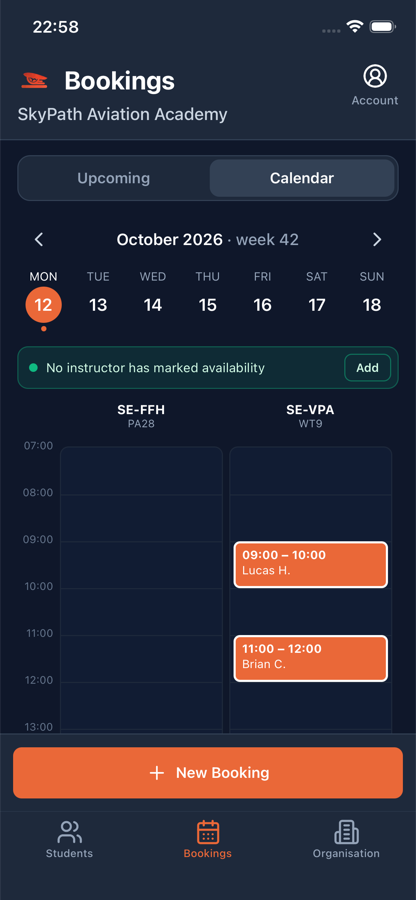
- Instructors mark when they are available. Students see the free slots and can book a lesson directly — if the organisation allows it. Club members can book school flights themselves, without phoning the desk.
- Default booking lengths and planned exercises attach to a booking. When the student books a two-hour slot for circuits, the booking carries that context into the lesson.
- Bookings live in the mobile app as well as on the web. The same calendar the chief CFI sees on the desktop is the one the instructor checks on the apron.
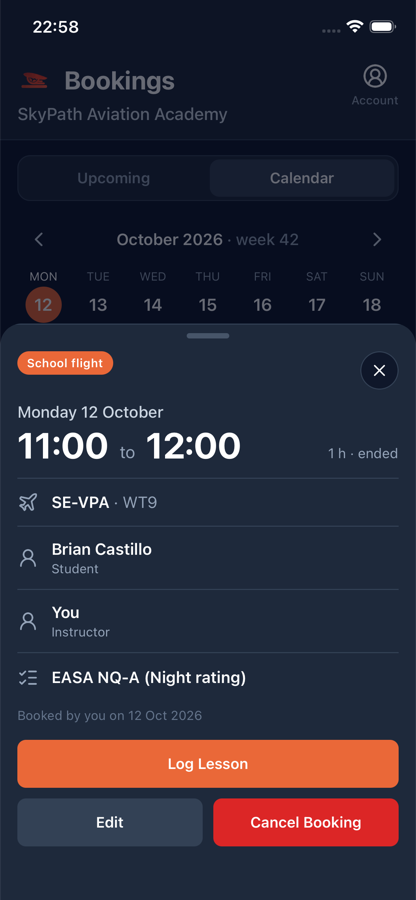
The booking is not just a placeholder. When the lesson happens, the instructor opens the booking and taps Log lesson — and the date, aircraft, student, and instructor are already filled in. No re-keying, no mix-ups. The booking becomes the lesson with one tap.
Record the flight with your phone
The newest piece — GPS flight tracking, new in 1.0.9 — is what removes the transcription step entirely.
On the Log Lesson screen, before taxiing, the instructor presses Start recording. The phone records the GPS track for the entire flight, including with the screen locked on iPhone. A banner stays visible across the app so you always know a recording is running, even when you switch screens.
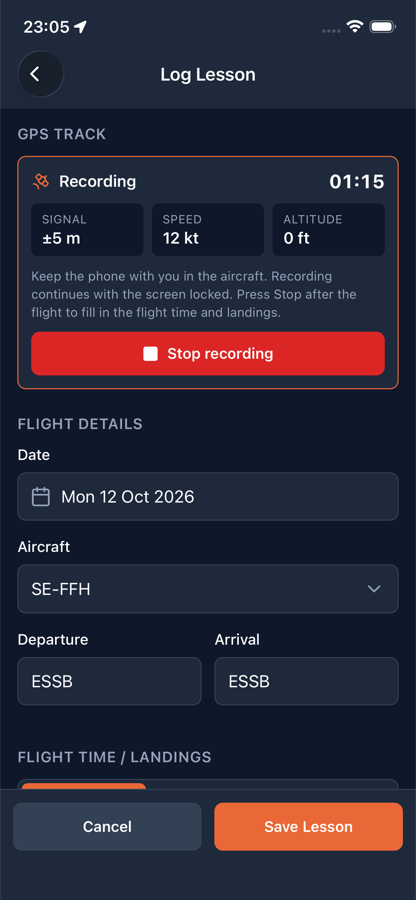
When the flight is over, press Stop. BetterFlare reads the track and fills in the details automatically:
- Take-off and landing times, detected from the GPS.
- Flight time and landings, worked out from the track.
- Block times (off-block and on-block), if your organisation uses them.
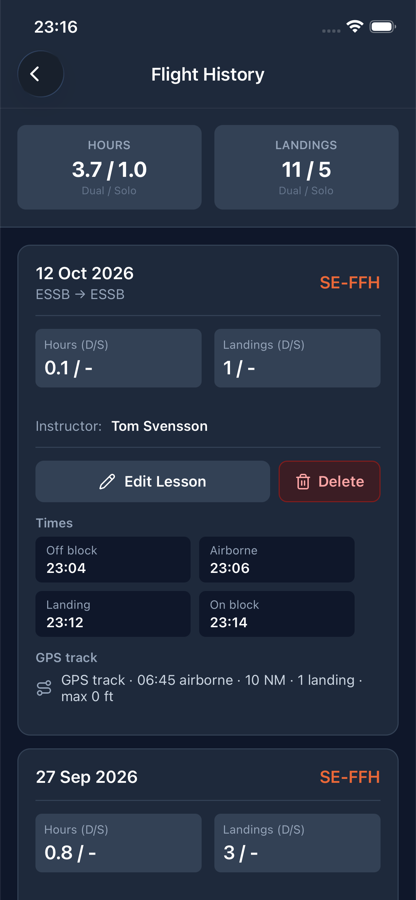
The track is saved with the lesson and shown on a map — street view and satellite view, full-screen — with airborne time, distance, landings, maximum altitude, and maximum groundspeed. It works for navigation flights and circuit training alike, so the satellite image of the route you actually flew is part of the training record, not a sketch on the back of a flight plan.
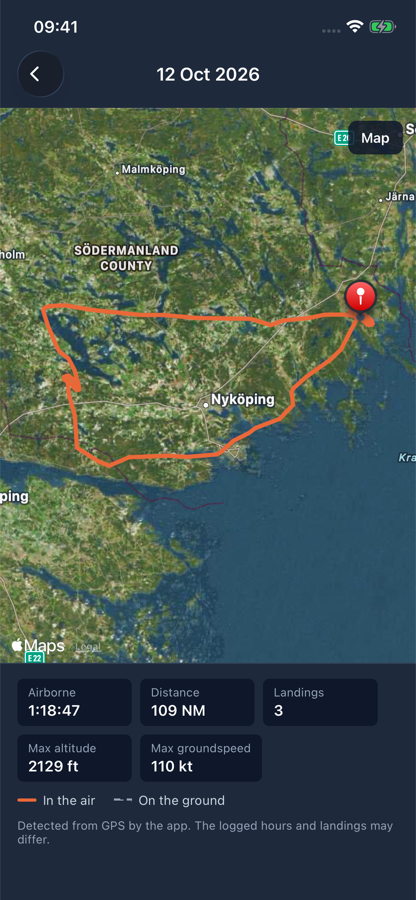
The upshot is that the instructor does not type any clock times after the flight. The phone was in the cockpit; the track did the work. The lesson entry is ready to save with the exercises ticked off and the feedback written — and the GPS track is there for the student to look at afterwards.
myWebLog: your bookings and flights, already in the app
Many Scandinavian flying clubs already use myWebLog for bookings and flight logging. If yours does, BetterFlare connects to it so you do not have to choose between the two systems.
The integration does two things:
- Bookings from myWebLog appear in the BetterFlare calendar. If your club books aircraft and instructors in myWebLog, those bookings show up alongside BetterFlare's own — one calendar, both sources. Member accounts are matched to BetterFlare users, so the right student is attached to the right booking.
- Flights logged in myWebLog land in an inbox, ready to become lessons. When a club member logs a flight in myWebLog, that flight log entry shows up in BetterFlare as a draft lesson with the data prefilled — date, aircraft, times. The instructor reviews it, ticks off the exercises, adds feedback, and saves. The lesson is in the training record without anyone typing the times a second time.
The point is not to replace myWebLog. It is to stop the training record from being the place where myWebLog data has to be manually re-entered. If the booking and the flight log already exist in myWebLog, BetterFlare picks them up and turns them into structured lessons — with the GPS track, exercise progression, and minimums tracking that myWebLog does not do.
How the three fit together
The booking, the GPS track, and the myWebLog integration are not three separate features that happen to ship in the same app. They are one workflow:
- The lesson is booked — in BetterFlare's calendar, or in myWebLog (which feeds BetterFlare's calendar).
- The instructor opens the booking and taps Log lesson. Date, aircraft, student, and instructor are prefilled.
- The GPS track records the flight. Take-off, landing, flight time, and landings are filled in from the track. No transcription.
- If the flight was logged in myWebLog, the flight log data is already waiting in the inbox — ready to merge with the lesson entry.
- The lesson is saved with exercises ticked off, feedback written, and the track on the map. The training record writes itself.
That is the difference between a booking system and a training-record system that includes bookings. The booking is the start of the lesson, not a separate thing that lives in a separate calendar and gets re-entered by hand. The GPS track is the flight, not a post-flight transcription exercise. And myWebLog is a source that feeds in, not a system you have to fight against.
What this means for your school or club
Whether you operate under FAA Part 61/141 or EASA Part-FCL, the recordkeeping requirement is the same: a complete, attributable training record per student, held by the organisation. The bottleneck is not the regulation — it is the practical work of getting each lesson into that record while the details are still fresh.
Bookings that become lessons with one tap, GPS tracks that fill in the times for you, and a myWebLog integration that stops the double entry — those are the three things that make the record-keeping keep up with the flying, instead of the other way around.
The booking calendar and GPS tracking are switched on per organisation. The myWebLog integration is available as a module — contact us if your club uses myWebLog and wants it connected.
Two instructors and unlimited students are free. A Flight School plan with unlimited instructors is €29/month. No card needed to start.
Ready to leave the paper behind?
BetterFlare helps instructors and flight schools keep student records organized, legible, and checkride-ready — bookings, GPS tracks, and myWebLog, all in one place. Learn more about how BetterFlare supports flight schools and instructors.